
Generate full Compose preview matrices from a single annotation, auto-creating locale × device × theme × sample permutations and eliminating manual Preview stacks and providers.



Stop hand-writing @Preview functions. Put one annotation on a screen and get it on every device, in both themes and in every state, in Android Studio and in a browsable map of your whole app.
 |
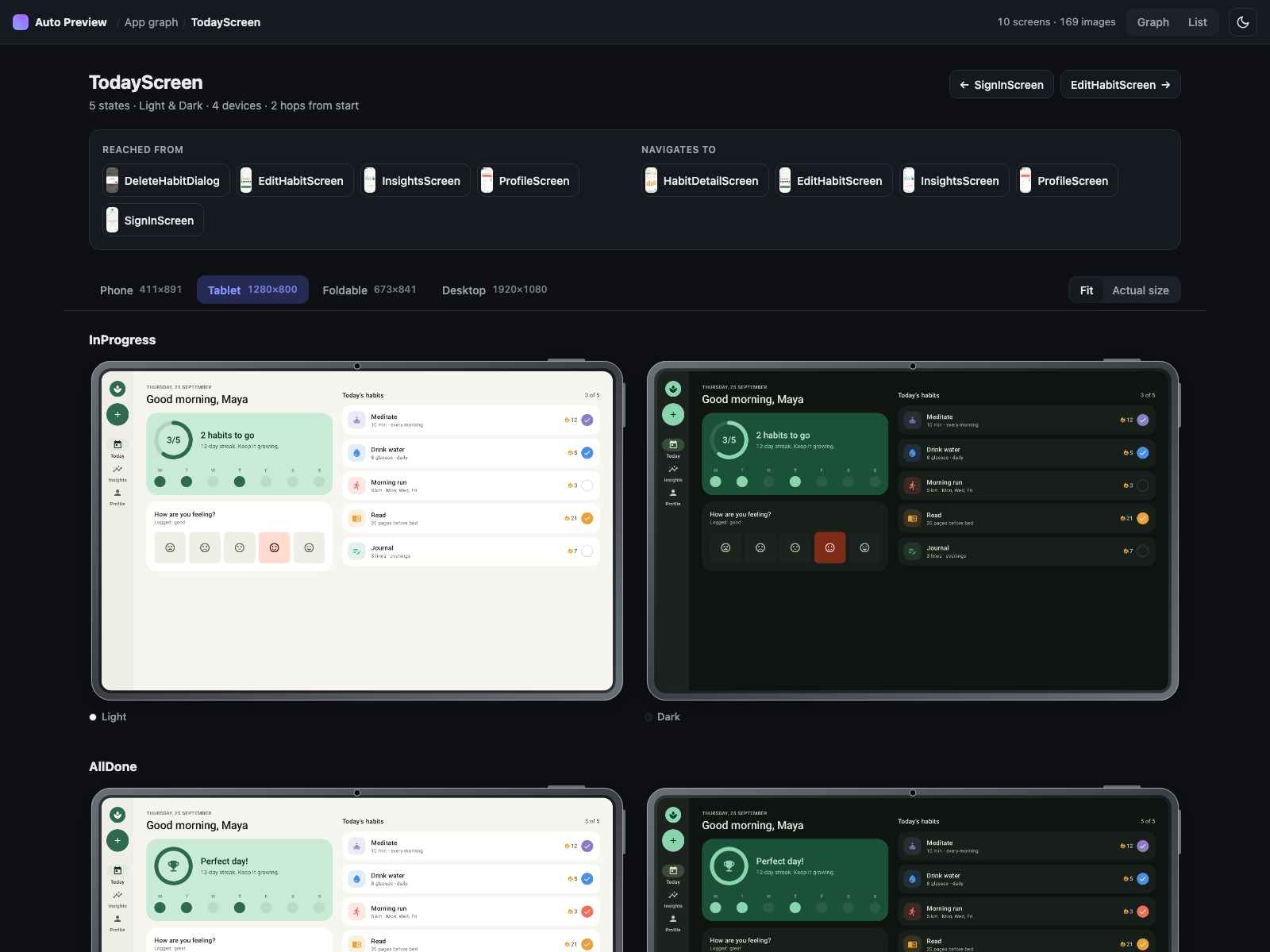 |
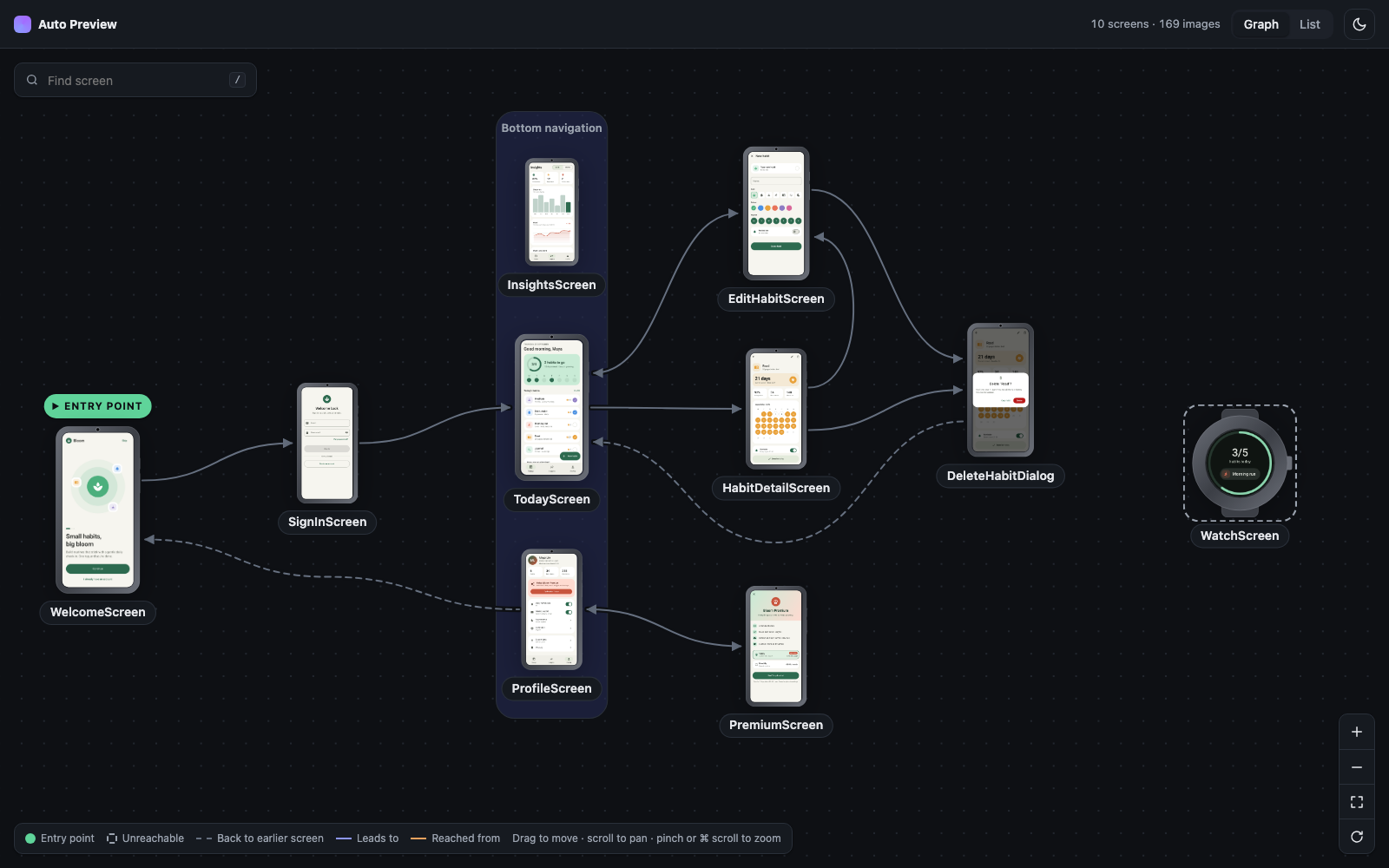
| Your app as a graph, starting from the first screen | Every state in light and dark, per device |
▶ Open the live demo report: the sample app's 10 screens, 169 renders
To really check a screen you want it on a phone and a tablet, in light and dark, and in every state: empty, loading, error, very long text. Written by hand, that's dozens of @Preview functions per screen, and nobody keeps them up to date. Put them all in one file and Android Studio's preview pane slows to a crawl.
Compose Auto Preview splits the work:
| Where | What you see |
|---|---|
| Android Studio | Every device and theme, for the first state. Light enough to keep editing. |
./gradlew autoPreview |
Every device, theme and state, rendered to images and opened as a report in your browser. |
| Your AI coding agent | The same images as plain PNG files, so it can see the UI it wrote and fix it. See With an AI coding agent. |
A coding agent can't see the screens it writes. The report gives it that: every render is a PNG at a predictable path, next to an index of all of them. Claude Code, Cursor, Codex, Copilot or any agent that reads images can open them and check its own work.
You don't need to read the rest of this page first. Paste this to set it up:
Add Compose Auto Preview to this project following
https://github.com/DrunkenDealer/compose-auto-preview#readme.
Give every screen a samples object that covers each state it can be in:
default, empty, loading, error and very long text.
Then run the autoPreview task and fix anything that fails to render.
And this after each UI change:
Run ./gradlew :app:autoPreview -PautoPreview.open=false, then open the images
in app/build/autopreview/images/. On every device, theme and language, look for
clipped or overlapping text, low contrast in dark mode, content under the
status bar or gesture handle, and states that are missing. Fix what you find
and run it again.
Use your app module instead of :app if it's named differently (see Kotlin Multiplatform). The agent finds everything under that module's build/autopreview/:
| Path | What's in it |
|---|---|
images/<module>/<Screen>/<locale>/<Device>/<Theme>/<Sample>.png |
One image per render |
assets/data.js |
Every screen and render as JSON: devices, states, languages, navigation links, and the error for each render that failed |
A render that throws doesn't fail the build. It shows up in data.js with its error, so ask the agent to check there too.
The simplest setup: one module, a few screens, one report.
1. Apply the plugin next to KSP. It adds everything else it needs for you.
// app/build.gradle.kts
plugins {
    alias(libs.plugins.ksp)
    id("app.mashlab.autopreview") version "0.3.0"
}
2. List your states. Any object with values of the screen's state type works:
object SettingsSamples {
    val Default          = SettingsState()
    val NotificationsOff = SettingsState(notificationsEnabled = false)
    val Filled           = SettingsState(username = "max")
}
3. Write one preview function per screen. It must be internal or public:
@AutoPreview(
    samplesFrom = SettingsSamples::class,
    devices = [Device.Phone, Device.Tablet],
)
@SettingsScreenAutoPreviews
@Composable
internal fun SettingsScreenPreview(
    @PreviewParameter(SettingsScreenPreviewSamplesProvider::class) state: SettingsState,
) = SettingsScreen(state)
@SettingsScreenAutoPreviews and SettingsScreenPreviewSamplesProvider are generated, so they stay red until the first build.
4. Open the report:
./gradlew :app:autoPreview
Studio now shows 4 previews (2 devices × 2 themes). The report has all 12 (× 3 states), and it opens in your browser. Nothing re-renders if the code didn't change.
When your features live in their own modules, apply the plugin to each feature module and to the app module that puts them together:
// feature/home/build.gradle.kts, feature/settings/build.gradle.kts, …
plugins {
    alias(libs.plugins.ksp)
    id("app.mashlab.autopreview") version "0.3.0"
}

// app/build.gradle.kts
plugins {
    id("app.mashlab.autopreview") version "0.3.0" // add KSP only if :app has previews of its own
}
dependencies {
    implementation(project(":feature:home"))
    implementation(project(":feature:settings"))
}
Screens can link to screens in other modules by name, so the graph connects across them:
// in :feature:home
@AutoPreview(samplesFrom = HomeSamples::class, navigatesTo = ["SettingsScreen"])

// in :feature:settings
@AutoPreview(samplesFrom = SettingsSamples::class)
Then pick how much of the app you want to see:
| You want | Run |
|---|---|
| One feature | ./gradlew :feature:home:autoPreview |
| A few features together | ./gradlew :app:autoPreview --modules=:feature:home,:feature:settings |
| The whole app | ./gradlew :app:autoPreview |
flowchart LR
    subgraph whole["./gradlew :app:autoPreview"]
        App[":app"]
        subgraph few["--modules=:feature:home,:feature:settings"]
            Home[":feature:home"]
            Settings[":feature:settings"]
        end
        Profile[":feature:profile"]
    end
    App --> Home & Settings & Profile
A few things to know:
--modules, write the module path in front (:app:autoPreview); a bare ./gradlew autoPreview runs in every module and fails in the ones that don't depend on what you listed.--modules aren't rendered at all, so a narrow report is also a fast one.entryPoint for its own report. In a merged report, the app module's entry point wins.States and samples can live in commonMain. The @AutoPreview function goes in androidMain.
A KMP library or feature module uses AGP's KMP library plugin and the same two lines as above:
// shared/build.gradle.kts or feature/settings/build.gradle.kts
plugins {
    alias(libs.plugins.kotlinMultiplatform)
    alias(libs.plugins.androidKotlinMultiplatformLibrary)
    alias(libs.plugins.composeMultiplatform)
    alias(libs.plugins.composeCompiler)
    alias(libs.plugins.ksp)
    id("app.mashlab.autopreview") version "0.3.0"
}

kotlin {
    androidLibrary {
        namespace = "com.example.feature.settings"
        compileSdk = 36
        minSdk = 28
        androidResources { enable = true } // needed for Compose Multiplatform resources
    }
    iosArm64()
    iosSimulatorArm64()
}
Res.string and Res.drawable show up in the report as they do in the app.
A KMP app has no :app module. The Android app module is called something else depending on which wizard created the project, and that's the module you run:
| Project | Android app module | Whole app |
|---|---|---|
| Created on AGP 8 | :composeApp |
./gradlew :composeApp:autoPreview |
| Created on AGP 9 | :androidApp |
./gradlew :androidApp:autoPreview |
// androidApp/build.gradle.kts (or composeApp)
plugins {
    id("app.mashlab.autopreview") version "0.3.0" // add KSP only if this module has previews of its own
}
One module, a few modules and --modules all work the same as in Several modules. See sample-kmp-library for a working example.
The report draws your screens as a graph. Mark the first screen with entryPoint and say where each screen leads with navigatesTo. A screen's name is its preview function without Preview, so SettingsScreenPreview is "SettingsScreen":
@AutoPreview(samplesFrom = WelcomeSamples::class, entryPoint = true, navigatesTo = ["SignInScreen"])
@AutoPreview(samplesFrom = SignInSamples::class, navigatesTo = ["TodayScreen"])
Screens the entry point can't reach are drawn dashed on the side. A navigatesTo that points to a screen the report can't find prints a warning.
Screens that belong together, such as the tabs of a bottom bar, share a group:
@AutoPreview(samplesFrom = TodaySamples::class, group = "Bottom navigation")
@AutoPreview(samplesFrom = InsightsSamples::class, group = "Bottom navigation")
@AutoPreview(samplesFrom = ProfileSamples::class, group = "Bottom navigation")
The report puts them side by side in a labelled box, like Bottom navigation in the screenshot at the top. Reaching one tab reaches them all, so you don't need navigatesTo between tabs. Groups work across modules too.
A preview shows only the composable you give it. If the bottom bar lives in your app's scaffold, it won't be in the image; to see it, wrap the screen in that scaffold inside the preview function.
Render a screen in several languages with locales, as resource qualifiers:
@AutoPreview(samplesFrom = WelcomeSamples::class, locales = ["en", "de", "uk"])Every language gets the full device × theme matrix. The report shows one language at a time: pick it in the header or press L, and it stays picked as you move between screens. On a screen page, Languages puts every language of one theme side by side, which is where text that no longer fits shows up. Android string resources and Compose Multiplatform Res.string both follow the language.
@AutoPreview parameters| Parameter | Type | Default |
|---|---|---|
samplesFrom |
KClass<*> |
— |
locales |
Array<String> |
[] (falls back to locale) |
locale |
String |
"en" (deprecated, use locales) |
devices |
Array<Device> |
[Device.Phone] |
themes |
Array<Theme> |
[Theme.Light, Theme.Dark] |
backgroundColor |
Long |
0xFFFFFFFF (white) |
showSystemUi |
Boolean |
false |
navigatesTo |
Array<String> |
[] |
entryPoint |
Boolean |
false |
group |
String |
"" (none) |
Device: Phone, Tablet, Foldable, Desktop, Tv, Wear (round). Theme: Light, Dark.
Put the common devices and themes in your own annotation:
@AutoPreview(
    samplesFrom = Unit::class, // replaced where you use it
    devices = [Device.Phone, Device.Tablet, Device.Foldable, Device.Desktop],
)
@Target(AnnotationTarget.FUNCTION)
@Retention(AnnotationRetention.SOURCE)
annotation class AppPreview(
    val samplesFrom: KClass<*>,
    val navigatesTo: Array<String> = [],
    val group: String = "",
)
Then write @AppPreview(samplesFrom = SettingsSamples::class) instead of @AutoPreview. Every parameter your annotation declares can be set where you use it.
AlertDialog, ModalBottomSheet and similar open in their own window. Wrap them in a full-size Box so there's something behind them:
internal fun ConfirmDialogPreview(
    @PreviewParameter(ConfirmDialogPreviewSamplesProvider::class) state: ConfirmDialogState,
) = Box(Modifier.fillMaxSize()) { ConfirmDialog(state) }WindowInsets shows up under them, as it would on a device. Frames come from Android Studio's device art.-PautoPreview.open=false. It never opens on CI.flowchart LR
A["@AutoPreview function"] --> K[KSP]
K --> S["Android Studio<br/>first state"]
K --> G["./gradlew autoPreview<br/>every state"]
G --> H["Images + HTML report"]At build time, KSP turns each @AutoPreview function into regular Compose previews for Studio. The Gradle plugin renders the same functions with Robolectric for every state, collects the images from each module, and writes a static HTML report you can open from disk. In the report, ←/→ step through images, T switches theme, L switches language, [/] switch screen and / searches.
Paparazzi, Roborazzi and Compose Preview Screenshot Testing are screenshot testing tools: they save reference images and fail the build when pixels change. You still write each preview or test yourself.
Compose Auto Preview does the step before that: it writes the previews for you and shows the whole app in one place. It doesn't compare images, so it works alongside those tools.
| Compose Auto Preview | Screenshot testing tools | |
|---|---|---|
| Writes the device × theme × state previews for you | ✅ | — |
| Keeps Studio's preview pane fast | ✅ | — |
| Map of the app from navigation | ✅ | — |
| Reference images and diff checks on CI | — | ✅ |
Kotlin 2.0+ · KSP 2.0+ · Jetpack Compose or Compose Multiplatform 1.7+ · minSdk 28 · JDK 17+
| Module type | Minimum AGP |
|---|---|
| Android app or library with Jetpack Compose | 8.0 with kotlin-android; on AGP 9's built-in Kotlin, KSP 2.3.6+ |
Android app or library with KMP androidTarget()
|
8.0; on AGP 9 only with android.builtInKotlin=false and android.newDsl=false
|
KMP library (com.android.kotlin.multiplatform.library) |
8.12.1, compileSdk 34 |
Tested on every AGP version from 8.0 to 9.4.
Issues and pull requests are welcome on GitHub. Try it on the sample habit tracker with ./gradlew :sample:autoPreview, or on the KMP library sample with ./gradlew :sample-kmp-library:autoPreview.
Stop hand-writing @Preview functions. Put one annotation on a screen and get it on every device, in both themes and in every state, in Android Studio and in a browsable map of your whole app.
|
|
| Your app as a graph, starting from the first screen | Every state in light and dark, per device |
▶ Open the live demo report: the sample app's 10 screens, 169 renders
To really check a screen you want it on a phone and a tablet, in light and dark, and in every state: empty, loading, error, very long text. Written by hand, that's dozens of @Preview functions per screen, and nobody keeps them up to date. Put them all in one file and Android Studio's preview pane slows to a crawl.
Compose Auto Preview splits the work:
| Where | What you see |
|---|---|
| Android Studio | Every device and theme, for the first state. Light enough to keep editing. |
./gradlew autoPreview |
Every device, theme and state, rendered to images and opened as a report in your browser. |
| Your AI coding agent | The same images as plain PNG files, so it can see the UI it wrote and fix it. See With an AI coding agent. |
A coding agent can't see the screens it writes. The report gives it that: every render is a PNG at a predictable path, next to an index of all of them. Claude Code, Cursor, Codex, Copilot or any agent that reads images can open them and check its own work.
You don't need to read the rest of this page first. Paste this to set it up:
Add Compose Auto Preview to this project following
https://github.com/DrunkenDealer/compose-auto-preview#readme.
Give every screen a samples object that covers each state it can be in:
default, empty, loading, error and very long text.
Then run the autoPreview task and fix anything that fails to render.
And this after each UI change:
Run ./gradlew :app:autoPreview -PautoPreview.open=false, then open the images
in app/build/autopreview/images/. On every device, theme and language, look for
clipped or overlapping text, low contrast in dark mode, content under the
status bar or gesture handle, and states that are missing. Fix what you find
and run it again.
Use your app module instead of :app if it's named differently (see Kotlin Multiplatform). The agent finds everything under that module's build/autopreview/:
| Path | What's in it |
|---|---|
images/<module>/<Screen>/<locale>/<Device>/<Theme>/<Sample>.png |
One image per render |
assets/data.js |
Every screen and render as JSON: devices, states, languages, navigation links, and the error for each render that failed |
A render that throws doesn't fail the build. It shows up in data.js with its error, so ask the agent to check there too.
The simplest setup: one module, a few screens, one report.
1. Apply the plugin next to KSP. It adds everything else it needs for you.
// app/build.gradle.kts
plugins {
    alias(libs.plugins.ksp)
    id("app.mashlab.autopreview") version "0.3.0"
}
2. List your states. Any object with values of the screen's state type works:
object SettingsSamples {
    val Default          = SettingsState()
    val NotificationsOff = SettingsState(notificationsEnabled = false)
    val Filled           = SettingsState(username = "max")
}
3. Write one preview function per screen. It must be internal or public:
@AutoPreview(
    samplesFrom = SettingsSamples::class,
    devices = [Device.Phone, Device.Tablet],
)
@SettingsScreenAutoPreviews
@Composable
internal fun SettingsScreenPreview(
    @PreviewParameter(SettingsScreenPreviewSamplesProvider::class) state: SettingsState,
) = SettingsScreen(state)
@SettingsScreenAutoPreviews and SettingsScreenPreviewSamplesProvider are generated, so they stay red until the first build.
4. Open the report:
./gradlew :app:autoPreview
Studio now shows 4 previews (2 devices × 2 themes). The report has all 12 (× 3 states), and it opens in your browser. Nothing re-renders if the code didn't change.
When your features live in their own modules, apply the plugin to each feature module and to the app module that puts them together:
// feature/home/build.gradle.kts, feature/settings/build.gradle.kts, …
plugins {
    alias(libs.plugins.ksp)
    id("app.mashlab.autopreview") version "0.3.0"
}

// app/build.gradle.kts
plugins {
    id("app.mashlab.autopreview") version "0.3.0" // add KSP only if :app has previews of its own
}
dependencies {
    implementation(project(":feature:home"))
    implementation(project(":feature:settings"))
}
Screens can link to screens in other modules by name, so the graph connects across them:
// in :feature:home
@AutoPreview(samplesFrom = HomeSamples::class, navigatesTo = ["SettingsScreen"])

// in :feature:settings
@AutoPreview(samplesFrom = SettingsSamples::class)
Then pick how much of the app you want to see:
| You want | Run |
|---|---|
| One feature | ./gradlew :feature:home:autoPreview |
| A few features together | ./gradlew :app:autoPreview --modules=:feature:home,:feature:settings |
| The whole app | ./gradlew :app:autoPreview |
flowchart LR
    subgraph whole["./gradlew :app:autoPreview"]
        App[":app"]
        subgraph few["--modules=:feature:home,:feature:settings"]
            Home[":feature:home"]
            Settings[":feature:settings"]
        end
        Profile[":feature:profile"]
    end
    App --> Home & Settings & Profile
A few things to know:
--modules, write the module path in front (:app:autoPreview); a bare ./gradlew autoPreview runs in every module and fails in the ones that don't depend on what you listed.--modules aren't rendered at all, so a narrow report is also a fast one.entryPoint for its own report. In a merged report, the app module's entry point wins.States and samples can live in commonMain. The @AutoPreview function goes in androidMain.
A KMP library or feature module uses AGP's KMP library plugin and the same two lines as above:
// shared/build.gradle.kts or feature/settings/build.gradle.kts
plugins {
    alias(libs.plugins.kotlinMultiplatform)
    alias(libs.plugins.androidKotlinMultiplatformLibrary)
    alias(libs.plugins.composeMultiplatform)
    alias(libs.plugins.composeCompiler)
    alias(libs.plugins.ksp)
    id("app.mashlab.autopreview") version "0.3.0"
}

kotlin {
    androidLibrary {
        namespace = "com.example.feature.settings"
        compileSdk = 36
        minSdk = 28
        androidResources { enable = true } // needed for Compose Multiplatform resources
    }
    iosArm64()
    iosSimulatorArm64()
}
Res.string and Res.drawable show up in the report as they do in the app.
A KMP app has no :app module. The Android app module is called something else depending on which wizard created the project, and that's the module you run:
| Project | Android app module | Whole app |
|---|---|---|
| Created on AGP 8 | :composeApp |
./gradlew :composeApp:autoPreview |
| Created on AGP 9 | :androidApp |
./gradlew :androidApp:autoPreview |
// androidApp/build.gradle.kts (or composeApp)
plugins {
    id("app.mashlab.autopreview") version "0.3.0" // add KSP only if this module has previews of its own
}
One module, a few modules and --modules all work the same as in Several modules. See sample-kmp-library for a working example.
The report draws your screens as a graph. Mark the first screen with entryPoint and say where each screen leads with navigatesTo. A screen's name is its preview function without Preview, so SettingsScreenPreview is "SettingsScreen":
@AutoPreview(samplesFrom = WelcomeSamples::class, entryPoint = true, navigatesTo = ["SignInScreen"])
@AutoPreview(samplesFrom = SignInSamples::class, navigatesTo = ["TodayScreen"])
Screens the entry point can't reach are drawn dashed on the side. A navigatesTo that points to a screen the report can't find prints a warning.
Screens that belong together, such as the tabs of a bottom bar, share a group:
@AutoPreview(samplesFrom = TodaySamples::class, group = "Bottom navigation")
@AutoPreview(samplesFrom = InsightsSamples::class, group = "Bottom navigation")
@AutoPreview(samplesFrom = ProfileSamples::class, group = "Bottom navigation")
The report puts them side by side in a labelled box, like Bottom navigation in the screenshot at the top. Reaching one tab reaches them all, so you don't need navigatesTo between tabs. Groups work across modules too.
A preview shows only the composable you give it. If the bottom bar lives in your app's scaffold, it won't be in the image; to see it, wrap the screen in that scaffold inside the preview function.
Render a screen in several languages with locales, as resource qualifiers:
@AutoPreview(samplesFrom = WelcomeSamples::class, locales = ["en", "de", "uk"])Every language gets the full device × theme matrix. The report shows one language at a time: pick it in the header or press L, and it stays picked as you move between screens. On a screen page, Languages puts every language of one theme side by side, which is where text that no longer fits shows up. Android string resources and Compose Multiplatform Res.string both follow the language.
@AutoPreview parameters| Parameter | Type | Default |
|---|---|---|
samplesFrom |
KClass<*> |
— |
locales |
Array<String> |
[] (falls back to locale) |
locale |
String |
"en" (deprecated, use locales) |
devices |
Array<Device> |
[Device.Phone] |
themes |
Array<Theme> |
[Theme.Light, Theme.Dark] |
backgroundColor |
Long |
0xFFFFFFFF (white) |
showSystemUi |
Boolean |
false |
navigatesTo |
Array<String> |
[] |
entryPoint |
Boolean |
false |
group |
String |
"" (none) |
Device: Phone, Tablet, Foldable, Desktop, Tv, Wear (round). Theme: Light, Dark.
Put the common devices and themes in your own annotation:
@AutoPreview(
    samplesFrom = Unit::class, // replaced where you use it
    devices = [Device.Phone, Device.Tablet, Device.Foldable, Device.Desktop],
)
@Target(AnnotationTarget.FUNCTION)
@Retention(AnnotationRetention.SOURCE)
annotation class AppPreview(
    val samplesFrom: KClass<*>,
    val navigatesTo: Array<String> = [],
    val group: String = "",
)
Then write @AppPreview(samplesFrom = SettingsSamples::class) instead of @AutoPreview. Every parameter your annotation declares can be set where you use it.
AlertDialog, ModalBottomSheet and similar open in their own window. Wrap them in a full-size Box so there's something behind them:
internal fun ConfirmDialogPreview(
    @PreviewParameter(ConfirmDialogPreviewSamplesProvider::class) state: ConfirmDialogState,
) = Box(Modifier.fillMaxSize()) { ConfirmDialog(state) }WindowInsets shows up under them, as it would on a device. Frames come from Android Studio's device art.-PautoPreview.open=false. It never opens on CI.flowchart LR
A["@AutoPreview function"] --> K[KSP]
K --> S["Android Studio<br/>first state"]
K --> G["./gradlew autoPreview<br/>every state"]
G --> H["Images + HTML report"]At build time, KSP turns each @AutoPreview function into regular Compose previews for Studio. The Gradle plugin renders the same functions with Robolectric for every state, collects the images from each module, and writes a static HTML report you can open from disk. In the report, ←/→ step through images, T switches theme, L switches language, [/] switch screen and / searches.
Paparazzi, Roborazzi and Compose Preview Screenshot Testing are screenshot testing tools: they save reference images and fail the build when pixels change. You still write each preview or test yourself.
Compose Auto Preview does the step before that: it writes the previews for you and shows the whole app in one place. It doesn't compare images, so it works alongside those tools.
| Compose Auto Preview | Screenshot testing tools | |
|---|---|---|
| Writes the device × theme × state previews for you | ✅ | — |
| Keeps Studio's preview pane fast | ✅ | — |
| Map of the app from navigation | ✅ | — |
| Reference images and diff checks on CI | — | ✅ |
Kotlin 2.0+ · KSP 2.0+ · Jetpack Compose or Compose Multiplatform 1.7+ · minSdk 28 · JDK 17+
| Module type | Minimum AGP |
|---|---|
| Android app or library with Jetpack Compose | 8.0 with kotlin-android; on AGP 9's built-in Kotlin, KSP 2.3.6+ |
Android app or library with KMP androidTarget()
|
8.0; on AGP 9 only with android.builtInKotlin=false and android.newDsl=false
|
KMP library (com.android.kotlin.multiplatform.library) |
8.12.1, compileSdk 34 |
Tested on every AGP version from 8.0 to 9.4.
Issues and pull requests are welcome on GitHub. Try it on the sample habit tracker with ./gradlew :sample:autoPreview, or on the KMP library sample with ./gradlew :sample-kmp-library:autoPreview.
