Generates blocking bridges for calling suspend functions from Java, simplifying integration. Automatically creates non-suspend bridge functions, ensuring minimal effort and high stability for production use.
Kotlin compiler plugin for generating blocking bridges for calling suspend functions from Java with minimal effort
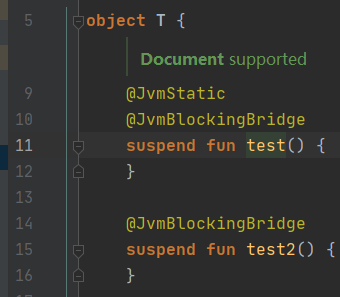
Kotlin suspend functions:
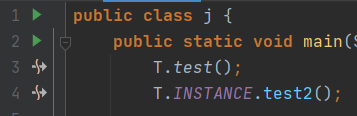
Bridge method calls:
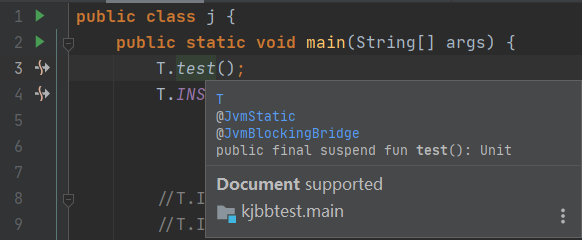
Documentation and navigation support:
Kotlin suspend function is compiled with an additional $completion: Continuation parameter, making it hard to call
from Java. To help integration with Java, we may make extra effort to simplify calling:
suspend fun downloadImage(): ImageWe can add
@JvmName("downloadImage") // avoid resolution ambiguity
fun downloadImageBlocking(): Image = runBlocking { downloadImage() }
so Java users can also call downloadImage() just like calling the suspend function, without implementing
a Continuation.
However, there several problems:
downloadImageBlocking is also exposed to Kotlin callers, and we can't hide them. We can make it 'difficult' to call
by adding RequiresOptIn
@RequiresOptIn(level = ERROR)
annotation class JavaFriendlyApi

@JavaFriendlyApi // so IDE reports 'Experimental API usage' error for calling from Kotlin.
@JvmName("downloadImage") // avoid resolution ambiguity
fun downloadImageBlocking(): Image = runBlocking { downloadImage() }
This plugin has been designed to minimize work against Java compatibility, to provide the ability to call
Kotlin's suspend function in a 'blocking' way:
@JvmBlockingBridge
suspend fun downloadImage(): Image
The Kotlin JVM Blocking Bridge compiler will generate such blocking bridges automatically.
Provide the easiest way to call suspend functions from Java:
interface Image

object ImageManager {
    @JvmStatic
    @JvmBlockingBridge
    suspend fun getImage(): Image
}
class Test {
public static void main(String[] args){
Image image = ImageManager.getImage(); // just like in Kotlin, no need to implement Continuation.
}
}In tests, add @JvmBlockingBridge to run suspend tests without runBlocking:
@file:JvmBlockingBridge

class SomeTests {
    @Test
    suspend fun test() { /* ... */ }
}There are more than 150 unit tests ensuring the functioning of this plugin.
This compiler plugin has been used all over the library mirai, which consists of 100k
lines of code, covers all the circumstances you may use this plugin for, and has been used by thousand of customers.
This means that Kotlin Jvm Blocking Bridge produces high stability and is capable for production use.
6.0 or higher recommended)1.4.20 or higherThe plugin is ready to use.
There is no special requirements for library users. They can use any IDEs and any build tools.
If you're developing a library, or an application using both Java and Kotlin with KJBB, or anything that relies on source code analysis, please install the Gradle plugin and the IntelliJ plugin.
It's strongly recommended using the latest IJ or AS, you may update
using JetBrains ToolBox.
Please note that Eclipse and Visual Studio aren't supported.
One-key install: Install to IntelliJ IDEA
You can also install manually:
File->Settings->Plugins->Marketplace in your IDEKotlin Jvm Blocking Bridge, download and installIn build.gradle or build.gradle.kts, add plugin:
plugins {
    id("me.him188.kotlin-jvm-blocking-bridge") version "VERSION"
}
See VERSION from releases, e.g. 3.1.0-180.1.
You also need to add runtime dependency as follows.
Please make sure you have it in runtime (use implementation or api, don't use compileOnly), because the compiled
bridges needs the runtime library.
For JVM projects:
dependencies {
    implementation("me.him188:kotlin-jvm-blocking-bridge-runtime:VERSION")
}
For MPP, adding to commonMain would automatically add for all targets:
kotlin.sourceSets {
    commonMain {
        dependencies {
            implementation("me.him188:kotlin-jvm-blocking-bridge-runtime:VERSION")
        }
    }
}
It's done. You can now use the @JvmBlockingBridge annotation.
KJBB completely supports MPP. You can use @JvmBlockingBridge in commonMain, and bridges are generated only for JVM and Android JVM
targets. The IDE plugin always provides you confidence on the final behavior.
This chapter lists the modules in the project. If you are interested in the internal mechanism of this plugin, it may be helpful.
Read specifications on BridgeFeatures.md
public annotation class me.him188.kotlin.jvm.blocking.bridge.JvmBlockingBridge
internal annotation class me.him188.kotlin.jvm.blocking.bridge.GeneratedBlockingBridge that is added
implicitly to generated bridges.Important Note: the runtime library contains not only the annotations, but also coroutine runner functions which is
required by the compiler plugin.
Therefore, you should not exclude the runtime library in shadowed jars (if your project uses so) or when running your
application.
Given Kotlin suspend function:
@JvmBlockingBridge
suspend fun test(a1: Int, a2: Any): String
This plugin generates the non-suspend bridge function with the same signature (visible only from Java)
@GeneratedBlockingBridge
fun test(a1: Int, a2: Any): String = `$runSuspend$` {
        test(a1, a2) // calls the original suspend `test`
} // `$runSuspend$` is a internal function in the runtime library, so we doesn't require kotlinx-coroutines-core. @JvmBlockingBridge
Kotlin compiler plugin for generating blocking bridges for calling suspend functions from Java with minimal effort
Kotlin suspend functions:
Bridge method calls:
Documentation and navigation support:
Kotlin suspend function is compiled with an additional $completion: Continuation parameter, making it hard to call
from Java. To help integration with Java, we may make extra effort to simplify calling:
suspend fun downloadImage(): ImageWe can add
@JvmName("downloadImage") // avoid resolution ambiguity
fun downloadImageBlocking(): Image = runBlocking { downloadImage() }
so Java users can also call downloadImage() just like calling the suspend function, without implementing
a Continuation.
However, there several problems:
downloadImageBlocking is also exposed to Kotlin callers, and we can't hide them. We can make it 'difficult' to call
by adding RequiresOptIn
@RequiresOptIn(level = ERROR)
annotation class JavaFriendlyApi

@JavaFriendlyApi // so IDE reports 'Experimental API usage' error for calling from Kotlin.
@JvmName("downloadImage") // avoid resolution ambiguity
fun downloadImageBlocking(): Image = runBlocking { downloadImage() }
This plugin has been designed to minimize work against Java compatibility, to provide the ability to call
Kotlin's suspend function in a 'blocking' way:
@JvmBlockingBridge
suspend fun downloadImage(): Image
The Kotlin JVM Blocking Bridge compiler will generate such blocking bridges automatically.
Provide the easiest way to call suspend functions from Java:
interface Image

object ImageManager {
    @JvmStatic
    @JvmBlockingBridge
    suspend fun getImage(): Image
}
class Test {
public static void main(String[] args){
Image image = ImageManager.getImage(); // just like in Kotlin, no need to implement Continuation.
}
}In tests, add @JvmBlockingBridge to run suspend tests without runBlocking:
@file:JvmBlockingBridge

class SomeTests {
    @Test
    suspend fun test() { /* ... */ }
}There are more than 150 unit tests ensuring the functioning of this plugin.
This compiler plugin has been used all over the library mirai, which consists of 100k
lines of code, covers all the circumstances you may use this plugin for, and has been used by thousand of customers.
This means that Kotlin Jvm Blocking Bridge produces high stability and is capable for production use.
6.0 or higher recommended)1.4.20 or higherThe plugin is ready to use.
There is no special requirements for library users. They can use any IDEs and any build tools.
If you're developing a library, or an application using both Java and Kotlin with KJBB, or anything that relies on source code analysis, please install the Gradle plugin and the IntelliJ plugin.
It's strongly recommended using the latest IJ or AS, you may update
using JetBrains ToolBox.
Please note that Eclipse and Visual Studio aren't supported.
One-key install: Install to IntelliJ IDEA
You can also install manually:
File->Settings->Plugins->Marketplace in your IDEKotlin Jvm Blocking Bridge, download and installIn build.gradle or build.gradle.kts, add plugin:
plugins {
    id("me.him188.kotlin-jvm-blocking-bridge") version "VERSION"
}
See VERSION from releases, e.g. 3.1.0-180.1.
You also need to add runtime dependency as follows.
Please make sure you have it in runtime (use implementation or api, don't use compileOnly), because the compiled
bridges needs the runtime library.
For JVM projects:
dependencies {
    implementation("me.him188:kotlin-jvm-blocking-bridge-runtime:VERSION")
}
For MPP, adding to commonMain would automatically add for all targets:
kotlin.sourceSets {
    commonMain {
        dependencies {
            implementation("me.him188:kotlin-jvm-blocking-bridge-runtime:VERSION")
        }
    }
}
It's done. You can now use the @JvmBlockingBridge annotation.
KJBB completely supports MPP. You can use @JvmBlockingBridge in commonMain, and bridges are generated only for JVM and Android JVM
targets. The IDE plugin always provides you confidence on the final behavior.
This chapter lists the modules in the project. If you are interested in the internal mechanism of this plugin, it may be helpful.
Read specifications on BridgeFeatures.md
public annotation class me.him188.kotlin.jvm.blocking.bridge.JvmBlockingBridge
internal annotation class me.him188.kotlin.jvm.blocking.bridge.GeneratedBlockingBridge that is added
implicitly to generated bridges.Important Note: the runtime library contains not only the annotations, but also coroutine runner functions which is
required by the compiler plugin.
Therefore, you should not exclude the runtime library in shadowed jars (if your project uses so) or when running your
application.
Given Kotlin suspend function:
@JvmBlockingBridge
suspend fun test(a1: Int, a2: Any): String
This plugin generates the non-suspend bridge function with the same signature (visible only from Java)
@GeneratedBlockingBridge
fun test(a1: Int, a2: Any): String = `$runSuspend$` {
        test(a1, a2) // calls the original suspend `test`
} // `$runSuspend$` is a internal function in the runtime library, so we doesn't require kotlinx-coroutines-core. @JvmBlockingBridge