
Enables declarative UI and application screen management in common code, ensuring compile-time safety and reactive data handling. Facilitates full application implementation from common code, adhering to platform rules.



This library is deprecated. Please use https://github.com/cashapp/redwood
This is a Kotlin MultiPlatform library that provides declarative UI and application screens management in common code. You can implement full application for Android and iOS only from common code with it.
| Android | iOS |
|---|---|
 |
 |
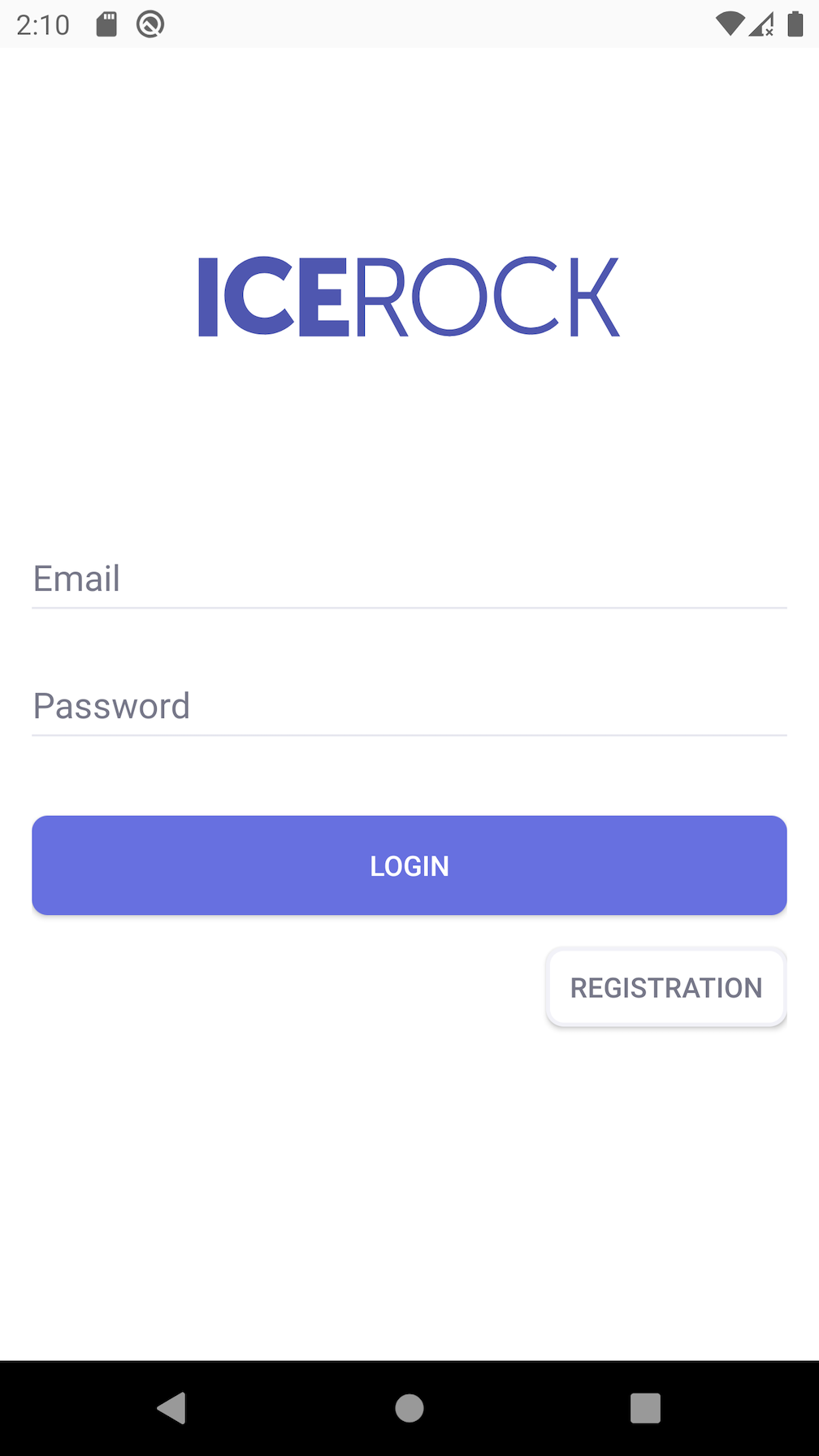
Code of screen structure:
class LoginScreen(
    private val theme: Theme,
    private val loginViewModelFactory: () -> LoginViewModel
) : WidgetScreen<Args.Empty>() {

    override fun createContentWidget() = with(theme) {
        val viewModel = getViewModel(loginViewModelFactory)

        constraint(size = WidgetSize.AsParent) {
            val logoImage = +image(
                size = WidgetSize.Const(SizeSpec.WrapContent, SizeSpec.WrapContent),
                image = const(Image.resource(MR.images.logo)),
                scaleType = ImageWidget.ScaleType.FIT
            )

            val emailInput = +input(
                size = WidgetSize.WidthAsParentHeightWrapContent,
                id = Id.EmailInputId,
                label = const("Email".desc() as StringDesc),
                field = viewModel.emailField,
                inputType = InputType.PHONE
            )
            val passwordInput = +input(
                size = WidgetSize.WidthAsParentHeightWrapContent,
                id = Id.PasswordInputId,
                label = const("Password".desc() as StringDesc),
                field = viewModel.passwordField
            )
            val loginButton = +button(
                size = WidgetSize.Const(SizeSpec.AsParent, SizeSpec.Exact(50f)),
                content = ButtonWidget.Content.Text(Value.data("Login".desc())),
                onTap = viewModel::onLoginPressed
            )

            val registerButton = +button(
                id = Id.RegistrationButtonId,
                size = WidgetSize.Const(SizeSpec.WrapContent, SizeSpec.Exact(40f)),
                content = ButtonWidget.Content.Text(Value.data("Registration".desc())),
                onTap = viewModel::onRegistrationPressed
            )

            val copyrightText = +text(
                size = WidgetSize.WrapContent,
                text = const("IceRock Development")
            )

            constraints {
                passwordInput centerYToCenterY root
                passwordInput leftRightToLeftRight root offset 16

                emailInput bottomToTop passwordInput offset 8
                emailInput leftRightToLeftRight root offset 16

                loginButton topToBottom passwordInput
                loginButton leftRightToLeftRight root

                registerButton topToBottom loginButton
                registerButton rightToRight root

                // logo image height must be automatic ?
                logoImage centerXToCenterX root
                logoImage.verticalCenterBetween(
                    top = root.top,
                    bottom = emailInput.top
                )

                copyrightText centerXToCenterX root
                copyrightText bottomToBottom root.safeArea offset 8
            }
        }
    }

    object Id {
        object EmailInputId : InputWidget.Id
        object PasswordInputId : InputWidget.Id
        object RegistrationButtonId : ButtonWidget.Id
    }
}
Code of theme:
val loginScreen = Theme(baseTheme) {
    factory[ConstraintWidget.DefaultCategory] = ConstraintViewFactory(
        padding = PaddingValues(16f),
        background = Background(
            fill = Fill.Solid(Colors.white)
        )
    )

    factory[InputWidget.DefaultCategory] = SystemInputViewFactory(
        margins = MarginValues(bottom = 8f),
        underLineColor = Color(0x000000DD),
        underLineFocusedColor = Color(0x3949ABFF),
        labelTextStyle = TextStyle(
            size = 12,
            color = Color(0x3949ABFF),
            fontStyle = FontStyle.BOLD
        ),
        errorTextStyle = TextStyle(
            size = 12,
            color = Color(0xB00020FF),
            fontStyle = FontStyle.BOLD
        ),
        textStyle = TextStyle(
            size = 16,
            color = Color(0x000000FF),
            fontStyle = FontStyle.MEDIUM
        )
    )

    val corners = platformSpecific(android = 8f, ios = 25f)

    factory[ButtonWidget.DefaultCategory] = SystemButtonViewFactory(
        margins = MarginValues(top = 32f),
        background = {
            val bg: (Color) -> Background = {
                Background(
                    fill = Fill.Solid(it),
                    shape = Shape.Rectangle(
                        cornerRadius = corners
                    )
                )
            }
            StateBackground(
                normal = bg(Color(0x6770e0FF)),
                pressed = bg(Color(0x6770e0EE)),
                disabled = bg(Color(0x6770e0BB))
            )
        }.invoke(),
        textStyle = TextStyle(
            color = Colors.white
        )
    )

    factory[LoginScreen.Id.RegistrationButtonId] = SystemButtonViewFactory(
        background = {
            val bg: (Color) -> Background = {
                Background(
                    fill = Fill.Solid(it),
                    shape = Shape.Rectangle(
                        cornerRadius = corners
                    )
                )
            }
            StateBackground(
                normal = bg(Color(0xFFFFFF00)),
                pressed = bg(Color(0xE7E7EEEE)),
                disabled = bg(Color(0x000000BB))
            )
        }.invoke(),
        margins = MarginValues(top = 16f),
        textStyle = TextStyle(
            color = Color(0x777889FF)
        ),
        androidElevationEnabled = false
    )
}root build.gradle
allprojects {
    repositories {
        mavenCentral()
    }
}
project build.gradle
dependencies {
    commonMainApi("dev.icerock.moko:widgets:0.2.4")

    commonMainApi("dev.icerock.moko:widgets-bottomsheet:0.2.4") // show bottom sheets
    commonMainApi("dev.icerock.moko:widgets-collection:0.2.4") // collection widget
    commonMainApi("dev.icerock.moko:widgets-datetime-picker:0.2.4") // show datepicker
    commonMainApi("dev.icerock.moko:widgets-image-network:0.2.4") // images with load from url
    commonMainApi("dev.icerock.moko:widgets-sms:0.2.4") // input with sms autofill
    commonMainApi("dev.icerock.moko:widgets-media:0.2.4") // moko-media integration
    commonMainApi("dev.icerock.moko:widgets-permissions:0.2.4") // moko-permissions integration
}root build.gradle
buildscript {
    repositories {
        gradlePluginPortal()
    }

    dependencies {
        classpath "dev.icerock.moko.widgets:gradle-plugin:0.2.4"
    }
}
project build.gradle
apply plugin: "dev.icerock.mobile.multiplatform-widgets-generator" // must apply before kotlin-multiplatform pluginMultiplatform application definition at mpp-library/src/commonMain/kotlin/App.kt:
class App : BaseApplication() {
    override fun setup(): ScreenDesc<Args.Empty> {
        val theme = Theme()

        return registerScreen(HelloWorldScreen::class) { HelloWorldScreen(theme) }
    }
}
Screen definition mpp-library/src/commonMain/kotlin/HelloWorldScreen.kt:
class HelloWorldScreen(
    private val theme: Theme
) : WidgetScreen<Args.Empty>() {

    override fun createContentWidget() = with(theme) {
        container(size = WidgetSize.AsParent) {
            center {
                text(
                    size = WidgetSize.WrapContent,
                    text = const("Hello World!")
                )
            }
        }
    }
}
Result:
| Android | iOS |
|---|---|
 |
 |
Setup theme config:
val theme = Theme {
    factory[TextWidget.DefaultCategory] = SystemTextViewFactory(
        textStyle = TextStyle(
            size = 24,
            color = Colors.black
        ),
        padding = PaddingValues(padding = 16f)
    )
}
Result:
| Android | iOS |
|---|---|
 |
 |
class TimerScreen(
    private val theme: Theme
) : WidgetScreen<Args.Empty>() {
    override fun createContentWidget(): Widget<WidgetSize.Const<SizeSpec.AsParent, SizeSpec.AsParent>> {
        val viewModel = getViewModel { TimerViewModel() }

        return with(theme) {
            container(size = WidgetSize.AsParent) {
                center {
                    text(
                        size = WidgetSize.WrapContent,
                        text = viewModel.text
                    )
                }
            }
        }
    }
}

class TimerViewModel : ViewModel() {
    private val iteration = MutableLiveData<Int>(0)
    val text: LiveData<StringDesc> = iteration.map { it.toString().desc() }

    init {
        viewModelScope.launch {
            while (isActive) {
                delay(1000)
                iteration.value = iteration.value + 1
            }
        }
    }
}Please see more examples in the sample directory.
widgets library;widgets-bottomsheet library;widgets-sms library;datetime-picker library;collection library;./publishToMavenLocal.shcd sample/ios-apppod installAndroid Studio - module android-app, run iOS from xcode workspace sample/ios-app/ios-app.xcworkspace
All development (both new features and bug fixes) is performed in the develop branch. This way master always contains the sources of the most recently released version. Please send PRs with bug fixes to the develop branch. Documentation fixes in the markdown files are an exception to this rule. They are updated directly in master.
The develop branch is pushed to master on release.
For more details on contributing please see the contributing guide.
Copyright 2019 IceRock MAG Inc.

Licensed under the Apache License, Version 2.0 (the "License");
you may not use this file except in compliance with the License.
You may obtain a copy of the License at

   http://www.apache.org/licenses/LICENSE-2.0

Unless required by applicable law or agreed to in writing, software
distributed under the License is distributed on an "AS IS" BASIS,
WITHOUT WARRANTIES OR CONDITIONS OF ANY KIND, either express or implied.
See the License for the specific language governing permissions and
limitations under the License.
This library is deprecated. Please use https://github.com/cashapp/redwood
This is a Kotlin MultiPlatform library that provides declarative UI and application screens management in common code. You can implement full application for Android and iOS only from common code with it.
| Android | iOS |
|---|---|
|
|
Code of screen structure:
class LoginScreen(
    private val theme: Theme,
    private val loginViewModelFactory: () -> LoginViewModel
) : WidgetScreen<Args.Empty>() {

    override fun createContentWidget() = with(theme) {
        val viewModel = getViewModel(loginViewModelFactory)

        constraint(size = WidgetSize.AsParent) {
            val logoImage = +image(
                size = WidgetSize.Const(SizeSpec.WrapContent, SizeSpec.WrapContent),
                image = const(Image.resource(MR.images.logo)),
                scaleType = ImageWidget.ScaleType.FIT
            )

            val emailInput = +input(
                size = WidgetSize.WidthAsParentHeightWrapContent,
                id = Id.EmailInputId,
                label = const("Email".desc() as StringDesc),
                field = viewModel.emailField,
                inputType = InputType.PHONE
            )
            val passwordInput = +input(
                size = WidgetSize.WidthAsParentHeightWrapContent,
                id = Id.PasswordInputId,
                label = const("Password".desc() as StringDesc),
                field = viewModel.passwordField
            )
            val loginButton = +button(
                size = WidgetSize.Const(SizeSpec.AsParent, SizeSpec.Exact(50f)),
                content = ButtonWidget.Content.Text(Value.data("Login".desc())),
                onTap = viewModel::onLoginPressed
            )

            val registerButton = +button(
                id = Id.RegistrationButtonId,
                size = WidgetSize.Const(SizeSpec.WrapContent, SizeSpec.Exact(40f)),
                content = ButtonWidget.Content.Text(Value.data("Registration".desc())),
                onTap = viewModel::onRegistrationPressed
            )

            val copyrightText = +text(
                size = WidgetSize.WrapContent,
                text = const("IceRock Development")
            )

            constraints {
                passwordInput centerYToCenterY root
                passwordInput leftRightToLeftRight root offset 16

                emailInput bottomToTop passwordInput offset 8
                emailInput leftRightToLeftRight root offset 16

                loginButton topToBottom passwordInput
                loginButton leftRightToLeftRight root

                registerButton topToBottom loginButton
                registerButton rightToRight root

                // logo image height must be automatic ?
                logoImage centerXToCenterX root
                logoImage.verticalCenterBetween(
                    top = root.top,
                    bottom = emailInput.top
                )

                copyrightText centerXToCenterX root
                copyrightText bottomToBottom root.safeArea offset 8
            }
        }
    }

    object Id {
        object EmailInputId : InputWidget.Id
        object PasswordInputId : InputWidget.Id
        object RegistrationButtonId : ButtonWidget.Id
    }
}
Code of theme:
val loginScreen = Theme(baseTheme) {
    factory[ConstraintWidget.DefaultCategory] = ConstraintViewFactory(
        padding = PaddingValues(16f),
        background = Background(
            fill = Fill.Solid(Colors.white)
        )
    )

    factory[InputWidget.DefaultCategory] = SystemInputViewFactory(
        margins = MarginValues(bottom = 8f),
        underLineColor = Color(0x000000DD),
        underLineFocusedColor = Color(0x3949ABFF),
        labelTextStyle = TextStyle(
            size = 12,
            color = Color(0x3949ABFF),
            fontStyle = FontStyle.BOLD
        ),
        errorTextStyle = TextStyle(
            size = 12,
            color = Color(0xB00020FF),
            fontStyle = FontStyle.BOLD
        ),
        textStyle = TextStyle(
            size = 16,
            color = Color(0x000000FF),
            fontStyle = FontStyle.MEDIUM
        )
    )

    val corners = platformSpecific(android = 8f, ios = 25f)

    factory[ButtonWidget.DefaultCategory] = SystemButtonViewFactory(
        margins = MarginValues(top = 32f),
        background = {
            val bg: (Color) -> Background = {
                Background(
                    fill = Fill.Solid(it),
                    shape = Shape.Rectangle(
                        cornerRadius = corners
                    )
                )
            }
            StateBackground(
                normal = bg(Color(0x6770e0FF)),
                pressed = bg(Color(0x6770e0EE)),
                disabled = bg(Color(0x6770e0BB))
            )
        }.invoke(),
        textStyle = TextStyle(
            color = Colors.white
        )
    )

    factory[LoginScreen.Id.RegistrationButtonId] = SystemButtonViewFactory(
        background = {
            val bg: (Color) -> Background = {
                Background(
                    fill = Fill.Solid(it),
                    shape = Shape.Rectangle(
                        cornerRadius = corners
                    )
                )
            }
            StateBackground(
                normal = bg(Color(0xFFFFFF00)),
                pressed = bg(Color(0xE7E7EEEE)),
                disabled = bg(Color(0x000000BB))
            )
        }.invoke(),
        margins = MarginValues(top = 16f),
        textStyle = TextStyle(
            color = Color(0x777889FF)
        ),
        androidElevationEnabled = false
    )
}root build.gradle
allprojects {
    repositories {
        mavenCentral()
    }
}
project build.gradle
dependencies {
    commonMainApi("dev.icerock.moko:widgets:0.2.4")

    commonMainApi("dev.icerock.moko:widgets-bottomsheet:0.2.4") // show bottom sheets
    commonMainApi("dev.icerock.moko:widgets-collection:0.2.4") // collection widget
    commonMainApi("dev.icerock.moko:widgets-datetime-picker:0.2.4") // show datepicker
    commonMainApi("dev.icerock.moko:widgets-image-network:0.2.4") // images with load from url
    commonMainApi("dev.icerock.moko:widgets-sms:0.2.4") // input with sms autofill
    commonMainApi("dev.icerock.moko:widgets-media:0.2.4") // moko-media integration
    commonMainApi("dev.icerock.moko:widgets-permissions:0.2.4") // moko-permissions integration
}root build.gradle
buildscript {
    repositories {
        gradlePluginPortal()
    }

    dependencies {
        classpath "dev.icerock.moko.widgets:gradle-plugin:0.2.4"
    }
}
project build.gradle
apply plugin: "dev.icerock.mobile.multiplatform-widgets-generator" // must apply before kotlin-multiplatform pluginMultiplatform application definition at mpp-library/src/commonMain/kotlin/App.kt:
class App : BaseApplication() {
    override fun setup(): ScreenDesc<Args.Empty> {
        val theme = Theme()

        return registerScreen(HelloWorldScreen::class) { HelloWorldScreen(theme) }
    }
}
Screen definition mpp-library/src/commonMain/kotlin/HelloWorldScreen.kt:
class HelloWorldScreen(
    private val theme: Theme
) : WidgetScreen<Args.Empty>() {

    override fun createContentWidget() = with(theme) {
        container(size = WidgetSize.AsParent) {
            center {
                text(
                    size = WidgetSize.WrapContent,
                    text = const("Hello World!")
                )
            }
        }
    }
}
Result:
| Android | iOS |
|---|---|
|
|
Setup theme config:
val theme = Theme {
    factory[TextWidget.DefaultCategory] = SystemTextViewFactory(
        textStyle = TextStyle(
            size = 24,
            color = Colors.black
        ),
        padding = PaddingValues(padding = 16f)
    )
}
Result:
| Android | iOS |
|---|---|
|
|
class TimerScreen(
    private val theme: Theme
) : WidgetScreen<Args.Empty>() {
    override fun createContentWidget(): Widget<WidgetSize.Const<SizeSpec.AsParent, SizeSpec.AsParent>> {
        val viewModel = getViewModel { TimerViewModel() }

        return with(theme) {
            container(size = WidgetSize.AsParent) {
                center {
                    text(
                        size = WidgetSize.WrapContent,
                        text = viewModel.text
                    )
                }
            }
        }
    }
}

class TimerViewModel : ViewModel() {
    private val iteration = MutableLiveData<Int>(0)
    val text: LiveData<StringDesc> = iteration.map { it.toString().desc() }

    init {
        viewModelScope.launch {
            while (isActive) {
                delay(1000)
                iteration.value = iteration.value + 1
            }
        }
    }
}Please see more examples in the sample directory.
widgets library;widgets-bottomsheet library;widgets-sms library;datetime-picker library;collection library;./publishToMavenLocal.shcd sample/ios-apppod installAndroid Studio - module android-app, run iOS from xcode workspace sample/ios-app/ios-app.xcworkspace
All development (both new features and bug fixes) is performed in the develop branch. This way master always contains the sources of the most recently released version. Please send PRs with bug fixes to the develop branch. Documentation fixes in the markdown files are an exception to this rule. They are updated directly in master.
The develop branch is pushed to master on release.
For more details on contributing please see the contributing guide.
Copyright 2019 IceRock MAG Inc.

Licensed under the Apache License, Version 2.0 (the "License");
you may not use this file except in compliance with the License.
You may obtain a copy of the License at

   http://www.apache.org/licenses/LICENSE-2.0

Unless required by applicable law or agreed to in writing, software
distributed under the License is distributed on an "AS IS" BASIS,
WITHOUT WARRANTIES OR CONDITIONS OF ANY KIND, either express or implied.
See the License for the specific language governing permissions and
limitations under the License.