
Refracts live desktop pixels behind transparent app windows via native screen-capture and GPU lens shader; also supplies portable source/surface modifiers to render liquid-glass over app content.
The first Compose Multiplatform Liquid Glass library with a native macOS ScreenCaptureKit + AppKit + Metal backend that refracts the real desktop behind a Compose Desktop window.
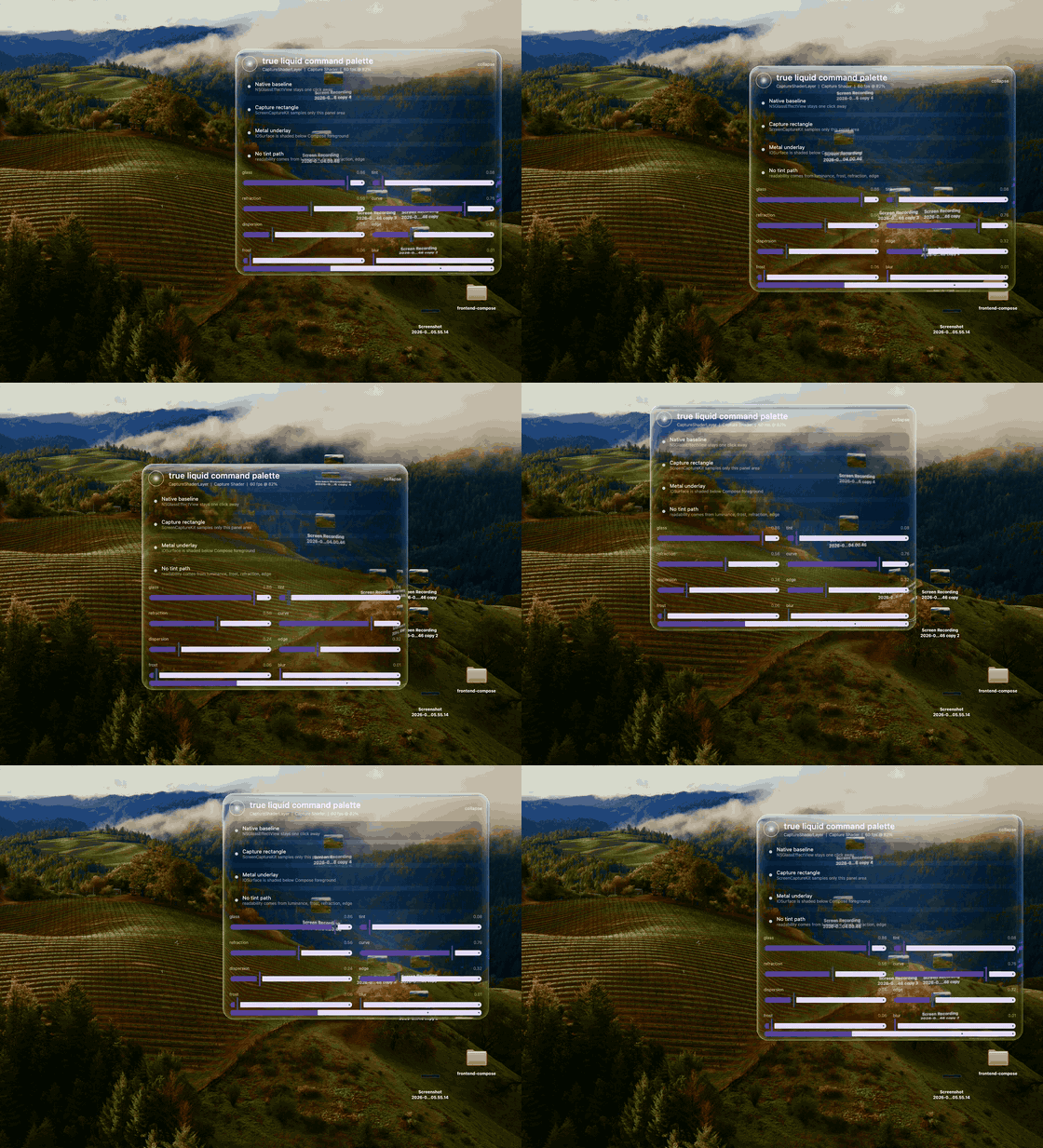
Click for the 50 fps H.264 capture.
True Liquid has two API layers:
TrueLiquidWindow for Compose Desktop on macOS. This is the flagship path: ScreenCaptureKit samples the real desktop/window rectangle behind the transparent window, Metal shades that IOSurface, and Compose draws foreground UI above it.Modifier.trueLiquidSource plus Modifier.trueLiquidSurface for Compose content on Android and Skiko targets. This samples explicitly marked Compose content and renders a liquid surface over it.The macOS backend is intentionally stronger than ordinary Compose-only glass because it can refract real desktop pixels behind the root window.
0.1.0-alpha02 is the current alpha line on Maven Central.
Platform shape:
| Platform | Window-level true desktop glass | Compose-content glass | Status |
|---|---|---|---|
| macOS Compose Desktop/JVM | Yes. ScreenCaptureKit + AppKit + Metal. | Yes. Skiko RuntimeEffect path. | Alpha flagship. |
| Android | No root-window desktop capture. | Yes on Android 13+ through RuntimeShader. | Alpha content surface. |
| iOS | No root-window desktop capture. | Configured through Skiko RuntimeEffect. | WIP, not visually certified yet. |
| Web/Wasm/JS | No root-window desktop capture. | Configured through Skiko RuntimeEffect where available. | WIP, not visually certified yet. |
| Linux Desktop/JVM | WIP. No native window-capture backend yet. | WIP through Skiko RuntimeEffect. | WIP. |
| Windows Desktop/JVM | WIP. No native window-capture backend yet. | WIP through Skiko RuntimeEffect. | WIP. |
The current library is macOS-first for the root window replacement use case. Other platforms get the portable Compose-content surface API while native desktop capture backends are intentionally deferred.
repositories {
    mavenCentral()
}

dependencies {
    implementation("io.github.sdfgsdfgd:true-liquid:0.1.0-alpha02")
}
For local development, use the included demo and build tasks.
fun main() = application {
    val state = rememberWindowState(size = DpSize(780.dp, 530.dp))
    val style = TrueLiquidDefaults.spotlightStyle()

    TrueLiquidWindow(
        title = "True Liquid",
        state = state,
        style = style,
        onCloseRequest = ::exitApplication,
    ) {
        Box(Modifier.fillMaxSize().trueLiquidDragRegion()) {
            Text(backendState.label)
        }
    }
}
TrueLiquidWindowScope exposes:
window: the underlying ComposeWindow.backendState: the selected native backend and Screen Recording permission state.beginWindowMove() / endWindowMove(): programmatic native move sessions for command/hotkey move flows.Use Modifier.trueLiquidDragRegion() on regions that should move the window. Interactive controls should omit it unless dragging is intended.
For cheap native macOS glass without Screen Recording permission or ScreenCaptureKit capture, use the same window API with the native-glass style:
TrueLiquidWindow(
    title = "Native Glass",
    state = rememberWindowState(size = DpSize(520.dp, 180.dp)),
    style = TrueLiquidDefaults.nativeGlassStyle(cornerRadius = 28f),
    onCloseRequest = ::exitApplication,
) {
    Text(backendState.label)
}
This uses NSGlassEffectView when available and falls back to NSVisualEffectView. It is fast and system-native, but it is not the flagship True Liquid capture shader path: it does not refract sampled desktop pixels through the Metal lens shader.
Use this path for Android, web, iOS, native Skiko, and ordinary Compose content inside desktop apps.
@Composable
fun LiquidContent() {
    val liquid = rememberTrueLiquidState()
    val style = TrueLiquidDefaults.clearLensStyle()

    Box {
        Image(
            painter = painterResource("background.jpg"),
            contentDescription = null,
            modifier = Modifier
                .fillMaxSize()
                .trueLiquidSource(liquid),
        )

        Box(
            Modifier
                .size(220.dp, 72.dp)
                .trueLiquidSurface(liquid, style, RoundedCornerShape(28.dp)),
        ) {
            Text("Liquid")
        }
    }
}
trueLiquidSource marks content that can be sampled. trueLiquidSurface renders the liquid effect from the latest source layers and then draws its own content above the glass.
If you are coming from other Compose liquid-glass libraries, the portable API maps like this:
| Source idea | True Liquid API | Notes |
|---|---|---|
FletchMcKee Liquid's rememberLiquidState()
|
rememberTrueLiquidState() |
Shared state that connects sampled content with liquid surfaces. |
FletchMcKee Liquid's Modifier.liquefiable(state)
|
Modifier.trueLiquidSource(state) |
Marks a Compose subtree as a sampleable source layer. |
FletchMcKee Liquid's Modifier.liquid(state)
|
Modifier.trueLiquidSurface(state, style, shape) |
Draws the refractive material over the latest source pixels. |
| Kyant Backdrop-style buttons, toggles, sliders, tabs | Build components with trueLiquidSurface
|
True Liquid stays low-level: compose your own controls from the source/surface primitives. |
The portable API is for content already inside Compose. On macOS, TrueLiquidWindow is stronger because it samples the real desktop behind the root window.
The capture-backed macOS window mode requires Screen Recording permission for the running Java app or packaged app.
when (TrueLiquidPermissions.screenCaptureStatus()) {
    TrueLiquidScreenCapturePermission.Granted -> Unit
    TrueLiquidScreenCapturePermission.NotGranted ->
        TrueLiquidPermissions.openScreenRecordingSettings()
    TrueLiquidScreenCapturePermission.Unsupported -> Unit
}
TrueLiquidMode.Auto falls back to native AppKit glass/visual effect when the capture shader path is not available.
val style = TrueLiquidDefaults.spotlightStyle(
    glassAlpha = 0.86f,
    tintAlpha = 0.08f,
    refraction = 0.56f,
    curve = 0.76f,
    dispersion = 0.24f,
    frost = 0.06f,
    blur = 0.01f,
    saturation = 1.16f,
    contrast = 0.05f,
    luminanceClamp = 0.28f,
    edge = 0.32f,
    depth = 0.78f,
    innerShadow = 0.46f,
    outerShadow = 0f,
    cornerRadius = 34f,
    captureScale = 0.82f,
    fps = 60,
)
Presets:
spotlightStyle(): stable command-palette default.clearLensStyle(): low tint, high optical sample alpha.prismStyle(): stronger curve, depth, and dispersion.nativeGlassStyle(): AppKit fallback without ScreenCaptureKit.gradle classes
gradle :true-liquid:jvmJar
gradle :demo:run
gradle verifyZenith10verifyZenith10 launches the demo and runs the hard video drag regression used to guard the macOS smoothness path.
The demo is non-instrumented by default. Instrumentation is opt-in through the scoring tools.
True Liquid stands on public work from the Compose liquid-glass community:
| Project | What it contributes | How True Liquid differs |
|---|---|---|
| FletchMcKee/liquid | Compose Multiplatform source/surface architecture for sampling already-composed content. | True Liquid keeps that portable idea, then adds a native macOS root-window backend that samples the actual desktop behind the window. |
| Kyant0/AndroidLiquidGlass | Strong Android RuntimeShader lens/refraction vocabulary. | True Liquid borrows the vocabulary, keeps one shared style model, and treats Android as the portable content-surface path. |
Both projects are Apache-2.0. See NOTICE.
True Liquid's macOS ScreenCaptureKit/AppKit/Metal backend is separate native work focused on refracting real desktop pixels behind a Compose Desktop window.
The first Compose Multiplatform Liquid Glass library with a native macOS ScreenCaptureKit + AppKit + Metal backend that refracts the real desktop behind a Compose Desktop window.
Click for the 50 fps H.264 capture.
True Liquid has two API layers:
TrueLiquidWindow for Compose Desktop on macOS. This is the flagship path: ScreenCaptureKit samples the real desktop/window rectangle behind the transparent window, Metal shades that IOSurface, and Compose draws foreground UI above it.Modifier.trueLiquidSource plus Modifier.trueLiquidSurface for Compose content on Android and Skiko targets. This samples explicitly marked Compose content and renders a liquid surface over it.The macOS backend is intentionally stronger than ordinary Compose-only glass because it can refract real desktop pixels behind the root window.
0.1.0-alpha02 is the current alpha line on Maven Central.
Platform shape:
| Platform | Window-level true desktop glass | Compose-content glass | Status |
|---|---|---|---|
| macOS Compose Desktop/JVM | Yes. ScreenCaptureKit + AppKit + Metal. | Yes. Skiko RuntimeEffect path. | Alpha flagship. |
| Android | No root-window desktop capture. | Yes on Android 13+ through RuntimeShader. | Alpha content surface. |
| iOS | No root-window desktop capture. | Configured through Skiko RuntimeEffect. | WIP, not visually certified yet. |
| Web/Wasm/JS | No root-window desktop capture. | Configured through Skiko RuntimeEffect where available. | WIP, not visually certified yet. |
| Linux Desktop/JVM | WIP. No native window-capture backend yet. | WIP through Skiko RuntimeEffect. | WIP. |
| Windows Desktop/JVM | WIP. No native window-capture backend yet. | WIP through Skiko RuntimeEffect. | WIP. |
The current library is macOS-first for the root window replacement use case. Other platforms get the portable Compose-content surface API while native desktop capture backends are intentionally deferred.
repositories {
    mavenCentral()
}

dependencies {
    implementation("io.github.sdfgsdfgd:true-liquid:0.1.0-alpha02")
}
For local development, use the included demo and build tasks.
fun main() = application {
    val state = rememberWindowState(size = DpSize(780.dp, 530.dp))
    val style = TrueLiquidDefaults.spotlightStyle()

    TrueLiquidWindow(
        title = "True Liquid",
        state = state,
        style = style,
        onCloseRequest = ::exitApplication,
    ) {
        Box(Modifier.fillMaxSize().trueLiquidDragRegion()) {
            Text(backendState.label)
        }
    }
}
TrueLiquidWindowScope exposes:
window: the underlying ComposeWindow.backendState: the selected native backend and Screen Recording permission state.beginWindowMove() / endWindowMove(): programmatic native move sessions for command/hotkey move flows.Use Modifier.trueLiquidDragRegion() on regions that should move the window. Interactive controls should omit it unless dragging is intended.
For cheap native macOS glass without Screen Recording permission or ScreenCaptureKit capture, use the same window API with the native-glass style:
TrueLiquidWindow(
    title = "Native Glass",
    state = rememberWindowState(size = DpSize(520.dp, 180.dp)),
    style = TrueLiquidDefaults.nativeGlassStyle(cornerRadius = 28f),
    onCloseRequest = ::exitApplication,
) {
    Text(backendState.label)
}
This uses NSGlassEffectView when available and falls back to NSVisualEffectView. It is fast and system-native, but it is not the flagship True Liquid capture shader path: it does not refract sampled desktop pixels through the Metal lens shader.
Use this path for Android, web, iOS, native Skiko, and ordinary Compose content inside desktop apps.
@Composable
fun LiquidContent() {
    val liquid = rememberTrueLiquidState()
    val style = TrueLiquidDefaults.clearLensStyle()

    Box {
        Image(
            painter = painterResource("background.jpg"),
            contentDescription = null,
            modifier = Modifier
                .fillMaxSize()
                .trueLiquidSource(liquid),
        )

        Box(
            Modifier
                .size(220.dp, 72.dp)
                .trueLiquidSurface(liquid, style, RoundedCornerShape(28.dp)),
        ) {
            Text("Liquid")
        }
    }
}
trueLiquidSource marks content that can be sampled. trueLiquidSurface renders the liquid effect from the latest source layers and then draws its own content above the glass.
If you are coming from other Compose liquid-glass libraries, the portable API maps like this:
| Source idea | True Liquid API | Notes |
|---|---|---|
FletchMcKee Liquid's rememberLiquidState()
|
rememberTrueLiquidState() |
Shared state that connects sampled content with liquid surfaces. |
FletchMcKee Liquid's Modifier.liquefiable(state)
|
Modifier.trueLiquidSource(state) |
Marks a Compose subtree as a sampleable source layer. |
FletchMcKee Liquid's Modifier.liquid(state)
|
Modifier.trueLiquidSurface(state, style, shape) |
Draws the refractive material over the latest source pixels. |
| Kyant Backdrop-style buttons, toggles, sliders, tabs | Build components with trueLiquidSurface
|
True Liquid stays low-level: compose your own controls from the source/surface primitives. |
The portable API is for content already inside Compose. On macOS, TrueLiquidWindow is stronger because it samples the real desktop behind the root window.
The capture-backed macOS window mode requires Screen Recording permission for the running Java app or packaged app.
when (TrueLiquidPermissions.screenCaptureStatus()) {
    TrueLiquidScreenCapturePermission.Granted -> Unit
    TrueLiquidScreenCapturePermission.NotGranted ->
        TrueLiquidPermissions.openScreenRecordingSettings()
    TrueLiquidScreenCapturePermission.Unsupported -> Unit
}
TrueLiquidMode.Auto falls back to native AppKit glass/visual effect when the capture shader path is not available.
val style = TrueLiquidDefaults.spotlightStyle(
    glassAlpha = 0.86f,
    tintAlpha = 0.08f,
    refraction = 0.56f,
    curve = 0.76f,
    dispersion = 0.24f,
    frost = 0.06f,
    blur = 0.01f,
    saturation = 1.16f,
    contrast = 0.05f,
    luminanceClamp = 0.28f,
    edge = 0.32f,
    depth = 0.78f,
    innerShadow = 0.46f,
    outerShadow = 0f,
    cornerRadius = 34f,
    captureScale = 0.82f,
    fps = 60,
)
Presets:
spotlightStyle(): stable command-palette default.clearLensStyle(): low tint, high optical sample alpha.prismStyle(): stronger curve, depth, and dispersion.nativeGlassStyle(): AppKit fallback without ScreenCaptureKit.gradle classes
gradle :true-liquid:jvmJar
gradle :demo:run
gradle verifyZenith10verifyZenith10 launches the demo and runs the hard video drag regression used to guard the macOS smoothness path.
The demo is non-instrumented by default. Instrumentation is opt-in through the scoring tools.
True Liquid stands on public work from the Compose liquid-glass community:
| Project | What it contributes | How True Liquid differs |
|---|---|---|
| FletchMcKee/liquid | Compose Multiplatform source/surface architecture for sampling already-composed content. | True Liquid keeps that portable idea, then adds a native macOS root-window backend that samples the actual desktop behind the window. |
| Kyant0/AndroidLiquidGlass | Strong Android RuntimeShader lens/refraction vocabulary. | True Liquid borrows the vocabulary, keeps one shared style model, and treats Android as the portable content-surface path. |
Both projects are Apache-2.0. See NOTICE.
True Liquid's macOS ScreenCaptureKit/AppKit/Metal backend is separate native work focused on refracting real desktop pixels behind a Compose Desktop window.