
Efficient XML parsing through a state machine, transforming XML strings into objects. Offers flexibility with hooks for parsing events like comments, tags, and attributes.
life is short, may time slow down
create a file named gpr.properties in your project root, filling with:
gpr.user="your username"
gpr.key="your token"
make sure you've added gpr.properties in .gitignore file !!!!
add gpr to your repositories section
maven {
    url = uri("https://maven.pkg.github.com/whiterasbk/slowxml")
    credentials {
        username = project.findProperty("gpr.user") as String? ?: System.getenv("USERNAME")
        password = project.findProperty("gpr.key") as String? ?: System.getenv("GITHUB_TOKEN")
    }
}
alternatively, jitpack is available within a few certain versions
repositories {
    maven { url = uri("https://jitpack.io") }
}
while using jitpack, you don't need a gpr.properties file, but latest version has to be only 0.2
add slowxml to your dependencies section
dependencies {
    implementation("com.github.whiterasbk:slowxml-$platform:$latest_version")
    // where platform be like: js, jvm
    // version may check in latest release
}
sync build.gradle.kts
use parseXml function by passing xml string, it will return a XmlNode object representing the xml string
here's a simple sample:
val node = parseXml("<root attr=\"value\"> 123 </root>")and you will be able to access its attributes through node.attrbutes, text content through node.content
also, if you prefer diving into it, loopInXmlString brings more flexibility:
var get = ""
loopInXmlString("<r> <!-- comment --> </a>") {
    onComment { get = it }
}
by calling onComment function, loopInXmlString will automate invoke the given lambda
as the inside pointer meet comment, get will be set to comment, then you can dill with it
the following is supported hooks:
onOpenTagonCloseTagonEndDefineAttributesonAttributeNameonAttributeValueonCommentonTextContentslowxml uses state machine to parse xml string into objects
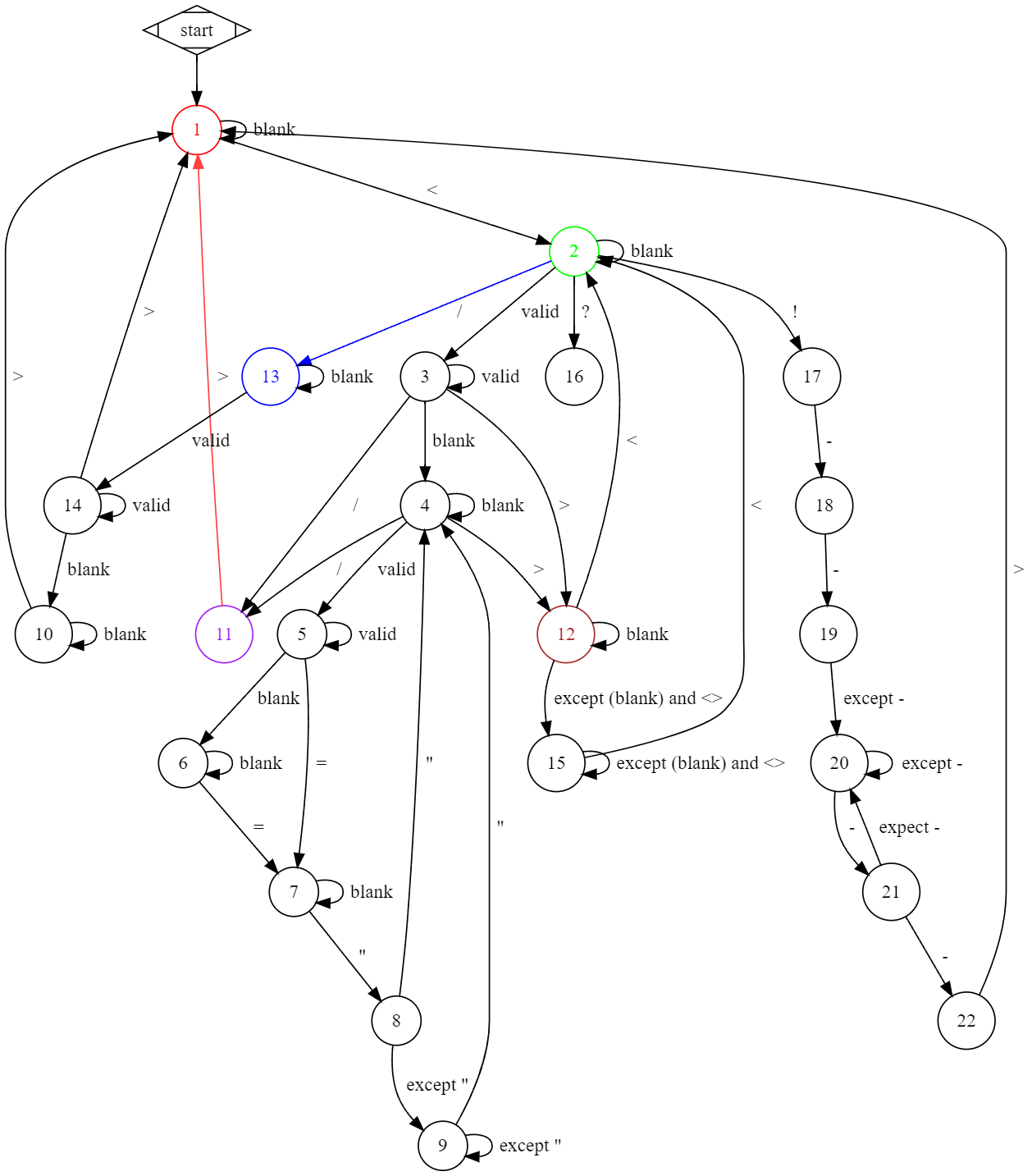
this state machine will change its state according to current pinter and state, which make the computer knows what the stage is it now
the state 11 switch to 1 happens only when meet close tag, no matter self close tag or not, base on this judgement, we can start our procession
when {
    //    ...
    previousState == 11 and currentState == 1 -> {
        // meet close tag, create a new node
    }
    //    ...
}
other situations can also be analyzed from below
digraph G {
   node [shape = circle];
   start [shape=Mdiamond]

   start -> 1
   1 -> 1 [label = "  blank"]
   1 -> 2 [label = "  <"]
   2 -> 2 [label = "  blank"]
   2 -> 3 [label = "  valid"]
   2 -> 13 [label = "  /", color=blue1]
   3 -> 3 [label = "  valid"]
   3 -> 4 [label = "  blank"]
   3 -> 11 [label = "  /"]
   3 -> 12 [label = ">"]
   4 -> 4 [label = "  blank"]
   4 -> 5 [label = "  valid"]
   4 -> 11 [label = "  /"]
   4 -> 12 [label = "  >"]
   5 -> 5 [label = "  valid"]
   5 -> 6 [label = "  blank"]
   5 -> 7 [label = "  ="]
   6 -> 6 [label = "  blank"]
   6 -> 7 [label = "  ="]
   7 -> 7 [label = "  blank"]
   7 -> 8 [label = "  qoute"]
   8 -> 4 [label = qoute]
   8 -> 9 [label = "  expect qoute"]
   9 -> 4 [label = "  qoute"]
   9 -> 9 [label = "  except qoute"]
   10 -> 1 [label = "  >"]
   10 -> 10 [label = "  blank"]
   11 -> 1 [label = "  >", color = brown1]
   12 -> 2 [label = "  <"]
   12 -> 12 [label = "  blank"]
   12 -> 15 [label = "  except (blank) and <>"]
   13 -> 13 [label = "  blank"]
   13 -> 14 [label = "  valid"]
   14 -> 1 [label = "  >"]
   14 -> 14 [label = "  valid"]
   14 -> 10 [label = "  blank"]
   15 -> 2 [label = "  <"]
   15 -> 15 [label = "  except (blank) and <>"]
}
link to GraphvizOnline to fully and lively access its code
life is short, may time slow down
create a file named gpr.properties in your project root, filling with:
gpr.user="your username"
gpr.key="your token"
make sure you've added gpr.properties in .gitignore file !!!!
add gpr to your repositories section
maven {
    url = uri("https://maven.pkg.github.com/whiterasbk/slowxml")
    credentials {
        username = project.findProperty("gpr.user") as String? ?: System.getenv("USERNAME")
        password = project.findProperty("gpr.key") as String? ?: System.getenv("GITHUB_TOKEN")
    }
}
alternatively, jitpack is available within a few certain versions
repositories {
    maven { url = uri("https://jitpack.io") }
}
while using jitpack, you don't need a gpr.properties file, but latest version has to be only 0.2
add slowxml to your dependencies section
dependencies {
    implementation("com.github.whiterasbk:slowxml-$platform:$latest_version")
    // where platform be like: js, jvm
    // version may check in latest release
}
sync build.gradle.kts
use parseXml function by passing xml string, it will return a XmlNode object representing the xml string
here's a simple sample:
val node = parseXml("<root attr=\"value\"> 123 </root>")and you will be able to access its attributes through node.attrbutes, text content through node.content
also, if you prefer diving into it, loopInXmlString brings more flexibility:
var get = ""
loopInXmlString("<r> <!-- comment --> </a>") {
    onComment { get = it }
}
by calling onComment function, loopInXmlString will automate invoke the given lambda
as the inside pointer meet comment, get will be set to comment, then you can dill with it
the following is supported hooks:
onOpenTagonCloseTagonEndDefineAttributesonAttributeNameonAttributeValueonCommentonTextContentslowxml uses state machine to parse xml string into objects
this state machine will change its state according to current pinter and state, which make the computer knows what the stage is it now
the state 11 switch to 1 happens only when meet close tag, no matter self close tag or not, base on this judgement, we can start our procession
when {
    //    ...
    previousState == 11 and currentState == 1 -> {
        // meet close tag, create a new node
    }
    //    ...
}
other situations can also be analyzed from below
digraph G {
   node [shape = circle];
   start [shape=Mdiamond]

   start -> 1
   1 -> 1 [label = "  blank"]
   1 -> 2 [label = "  <"]
   2 -> 2 [label = "  blank"]
   2 -> 3 [label = "  valid"]
   2 -> 13 [label = "  /", color=blue1]
   3 -> 3 [label = "  valid"]
   3 -> 4 [label = "  blank"]
   3 -> 11 [label = "  /"]
   3 -> 12 [label = ">"]
   4 -> 4 [label = "  blank"]
   4 -> 5 [label = "  valid"]
   4 -> 11 [label = "  /"]
   4 -> 12 [label = "  >"]
   5 -> 5 [label = "  valid"]
   5 -> 6 [label = "  blank"]
   5 -> 7 [label = "  ="]
   6 -> 6 [label = "  blank"]
   6 -> 7 [label = "  ="]
   7 -> 7 [label = "  blank"]
   7 -> 8 [label = "  qoute"]
   8 -> 4 [label = qoute]
   8 -> 9 [label = "  expect qoute"]
   9 -> 4 [label = "  qoute"]
   9 -> 9 [label = "  except qoute"]
   10 -> 1 [label = "  >"]
   10 -> 10 [label = "  blank"]
   11 -> 1 [label = "  >", color = brown1]
   12 -> 2 [label = "  <"]
   12 -> 12 [label = "  blank"]
   12 -> 15 [label = "  except (blank) and <>"]
   13 -> 13 [label = "  blank"]
   13 -> 14 [label = "  valid"]
   14 -> 1 [label = "  >"]
   14 -> 14 [label = "  valid"]
   14 -> 10 [label = "  blank"]
   15 -> 2 [label = "  <"]
   15 -> 15 [label = "  except (blank) and <>"]
}
link to GraphvizOnline to fully and lively access its code